

Last Updated: Nov 2, 2026
Quick Answer
Decades of cognitive science research, most notably Richard Mayer's Cognitive Theory of Multimedia Learning, strongly support using audio narration in eLearning, but only when it's done right. The evidence shows that a warm human voice paired with relevant visuals outperforms text-heavy slides, narration that duplicates on-screen text word-for-word, and synthesized machine voices. Pacing, chunking, and script tone matter just as much as who you hire.
In this guide
-
Why the "should we narrate?" debate has a research-backed answer
-
Mayer's Cognitive Theory of Multimedia Learning: the foundation
-
Chunking and segmenting: breaking content into what the brain can hold
Why the "Should We Narrate?" Debate Has a Research-Backed Answer
If you've ever sat through an eLearning course where a robotic voice read every bullet point verbatim, you've experienced bad narration, and that experience probably colors how your team debates whether to use audio at all.
The question worth asking isn't whether to include audio. It's how to use it. For that, there's a substantial body of peer-reviewed cognitive science pointing toward clear answers. The place to start is the parent resource for this page, our guide to eLearning and training voiceover, which covers the broader landscape of voice in course production. This page goes one level deeper, into the learning science itself.
The short version: narration, when it's well-designed and delivered by a skilled human voice talent, meaningfully supports comprehension and retention. The evidence for that comes mostly from one body of work.
Section summary: The research case for audio narration is solid, but execution determines whether narration helps or hurts learning outcomes.
Mayer's Cognitive Theory of Multimedia Learning: The Foundation
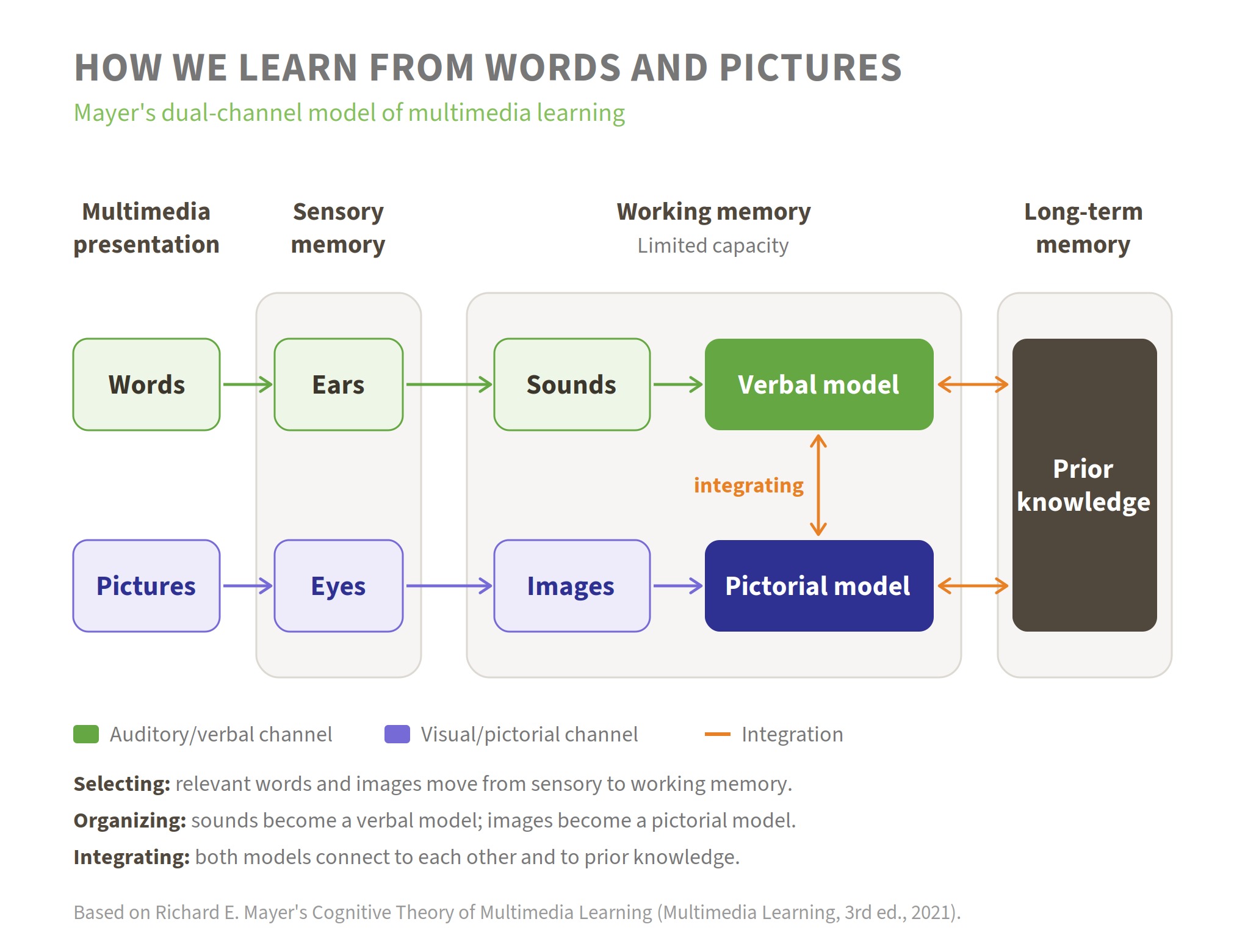
Richard Mayer's Cognitive Theory of Multimedia Learning (CTML), developed at the University of California Santa Barbara over several decades, is the most rigorously tested framework for understanding how people learn from words and visuals together.
The core ideas rest on three assumptions: dual channels (humans have separate information-processing channels for verbal and visual information), limited capacity (each channel can only process a small amount of material at a time), and active processing (meaningful learning involves selecting relevant material, organizing it into coherent mental models, and integrating those models with prior knowledge). These foundations are described in detail in Mayer's chapter in The Cambridge Handbook of Multimedia Learning (Cambridge University Press).
In practical terms: the brain takes in information and processes it through multiple channels based on how that information is presented. Visually represented material (pictures, videos, charts, printed words) enters through the visual channel. Auditory material, including spoken narration, is processed separately. That separation matters enormously for course design. When you pair a graphic with audio narration, you use both channels effectively; when you pair a graphic with on-screen text, both compete for the same visual channel.
Mayer's 2017 review article in the Journal of Computer Assisted Learning (Wiley, 2017) synthesized effect sizes across his 12 principles, giving course designers a quantified sense of what works hardest.
Section summary: Your learners have two separate cognitive channels — visual and auditory. Well-designed narration uses the auditory channel to carry meaning, freeing the visual channel for graphics and reducing total cognitive load.
The Modality Principle: Let Audio Carry the Explanation
The Modality Principle is one of the most-researched of Mayer's 12 principles and one of the most directly useful for eLearning designers.
The Modality Principle holds that people learn more deeply from pictures and spoken words than from pictures and printed words (Cambridge University Press, Multimedia Learning). Mayer's 2017 Journal of Computer Assisted Learning review recorded this effect at a median d = 0.72 — a consistent advantage in favor of audio narration over on-screen text when graphics are involved (Wiley, 2017).
Why? When you put an explanation in text, it competes directly with the graphics for visual channel capacity. As Mayer explains, in an animation-with-on-screen-text version, "both the pictures and the words enter the cognitive system through the eyes, causing an overload in the visual system. In the animation-with-narration version, the words are off-loaded onto the verbal channel" (Cambridge, Multimedia Learning).
The effect is strongest when material is complex, the presentation is fast-paced, and learners are relatively new to the subject. It is less pronounced for learners with high prior knowledge, for non-native speakers, or when the lesson contains technical symbols that benefit from being seen as well as heard.
The practical rule is straightforward: when your slide or screen contains a meaningful graphic (a process diagram, a chart, a scenario image) let the narration carry the verbal explanation. Don't split the learner's visual attention between the image and a block of explanatory text.
Section summary: If your screen has a graphic, audio narration is the right channel for the explanation. On-screen text competes with the image for the learner's limited visual processing capacity.
The Redundancy Principle: Stop Reading the Slides Out Loud
This is where a lot of corporate eLearning goes wrong, and where designers often get the most pushback from stakeholders who assume more content means more learning.
Mayer's Redundancy Principle dictates that people learn better from graphics plus narration than from graphics plus narration plus text. His 2017 meta-analysis measured this effect at d = 0.87 — a strong effect, in the direction of removing on-screen text that duplicates the audio (Wiley, 2017). The underlying principle is captured concisely in the 2017 paper's summary of that principle: "Do not add on-screen text to narrated graphics."
The theory is that when learners already have narration and graphics, redundant on-screen text is extraneous cognitive load and it uses up processing capacity without adding meaning.
There's an important nuance: the Redundancy Principle applies when the audio and text are saying the same thing. Brief on-screen labels, key terms, procedural steps, or captions for accessibility are a different matter — those are complementary, not redundant.
|
On-Screen Text |
Audio Narration |
Research Verdict |
|---|---|---|
|
Full paragraph explanation |
Same paragraph read aloud |
❌ Redundant — hurts learning |
|
Graphic only |
Full explanation in narration |
✅ Modality principle — works well |
|
Key term or step label |
Expanded explanation |
✅ Complementary — works well |
|
Nothing |
Dense narration, no visual anchor |
⚠️ Missing the multimedia advantage |
Section summary: Narrating your slides verbatim isn't neutral — it actively reduces learning. Use on-screen text for labels and key terms, and let narration carry the explanation.
The Personalization Principle: Conversational Beats Formal
One of the more counterintuitive findings in Mayer's work is that tone of voice — specifically, whether the script sounds like a person talking or a compliance document — affects how much people retain.
The Personalization Principle is that "people learn more deeply when the words in a multimedia presentation are in conversational style rather than formal style" (Cambridge University Press, Cambridge Handbook of Multimedia Learning). This principle was supported in 14 out of 17 experimental tests, yielding a median effect size of d = 0.79 (Wiley, 2017).
For script writers, this has direct implications. Use first person — I, you, we, our. Avoid formal, bureaucratic language. Write the way you'd explain a concept to a colleague sitting next to you. Researchers note some boundary conditions: the personalization effect may be smaller for high-achieving learners or very long lessons, so this isn't a universal rule, but it applies to the vast majority of corporate training content.
This is also one reason a skilled voice actor matters beyond just clean audio. A professional narrator who sounds like they're talking to the learner — not reciting at them — reinforces the personalization effect at the delivery level, even when the script is already written conversationally. For more on writing scripts that support this, see our guide to how to write a voiceover script.
Section summary: Write your narration script the way you'd explain the topic to a colleague — first person, plain language, relaxed syntax. Formal, document-style scripts undercut learning, and no amount of good delivery fully rescues a stiff script.
The Voice Principle: Human Voice vs. Machine Voice
Mayer's Voice Principle states that "people learn more deeply when the words in a multimedia message are spoken in a human voice rather than in a machine voice" (Cambridge University Press, Cambridge Handbook of Multimedia Learning). The principle was supported in 5 out of 6 experimental comparisons, with a median effect size of d = 0.74 (Wiley, 2017).
Researchers propose that human voices trigger a social presence response. Learners engage more deeply with material when they sense a real person communicating with them. A more recent review in ScienceDirect corroborated this reading of the original Mayer studies while also noting that as synthesized voice quality improves, the gap may narrow in some conditions (ScienceDirect, 2019). That caveat is worth taking seriously: the Voice Principle has a smaller and more developing evidence base than the Modality or Redundancy principles. The direction of the evidence consistently favors human voices, but it's worth some humility when arguing this specific point with skeptical stakeholders.
The practical case extends beyond the lab, though. In regulated industries especially, the risks of AI voice are compounding. Our companion piece AI voice in regulated industries covers the compliance considerations in detail.
At VoiceJungle, every voice talent on the platform is human — fully vetted for ability and studio quality. We don't sell AI voices. If you want to understand what that vetting actually involves, What Does It Mean to Vet Voice Talent? walks through the process.
Section summary: The evidence consistently favors human voices over synthesized ones for learning outcomes. The Voice Principle's research base is still growing, but the practical and compliance case for human narration is strong — especially in corporate and regulated training contexts.
Pacing: How Many Words Per Minute Is Right for eLearning?
Pacing is one of the most concrete decisions you'll make in eLearning narration, and it has a direct effect on how much learners absorb.
The standard commercial voiceover pacing of 160–180 words per minute is generally too fast for instructional content, especially in accessibility-focused modules (VoiceoverNews, 2026). Most eLearning practitioners target 130–150 words per minute for instructional narration, depending on the complexity of the material, with 130–140 WPM being the common range for technical or dense content (bonlinelearning.com). A slower pace gives learners space to absorb and reflect — especially when information is new, technical, or critical to job performance.
As a practical planning guide:
|
Content Type |
Suggested Pace |
Notes |
|---|---|---|
|
New concepts, technical content |
120–130 WPM |
Slower for novice audiences or non-native English speakers |
|
Standard corporate training |
130–145 WPM |
Most common eLearning narration range |
|
Refresher / awareness content |
145–155 WPM |
Familiar material, higher prior knowledge |
|
Commercial / promotional |
160–180 WPM |
Not recommended for instructional use |
Pace also affects script length planning. At 130 WPM, a 5-minute module needs roughly 650 words of narration, not counting pauses. Build in deliberate pauses at slide transitions, after key concepts, and before interaction points.
For courses that include technical terminology, acronyms, or numbers written numerically, note that word-count tools count acronyms, numbers, and URLs as single words, but they take longer to say aloud.. Budget accordingly.
Section summary: Target 130–150 WPM for most corporate eLearning narration, and plan deliberate pauses. Scripts that sound fast in a studio playback often feel even faster to a learner who is also reading, watching animations, and processing new concepts simultaneously.
Chunking and Segmenting: Breaking Content Into What the Brain Can Hold
Mayer's Segmenting Principle holds that people learn more deeply when a multimedia message is presented in learner-paced segments rather than as a continuous unit. In his 2017 review, this principle returned a median effect size of d = 0.70 (Wiley, 2017). The rationale: segmenting allows learners to fully process one step before moving on, and it puts control of pace in their hands rather than the course's.
An independent UNH teaching resource summarizing Mayer's principles notes that this effect was "supported in 7 out of 7 experimental tests, yielding a median effect size of 0.67," adding that it may have "stronger effects when the material is complex for the learner and when the lesson is otherwise fast-paced" (UNH Teaching & Learning Resource Hub).
For narration specifically, chunking means:
-
Keep individual narrated segments short. Aim for 60–90 seconds of narration before a natural pause, interaction, or screen change.
-
Front-load key concepts. Introduce the main idea before the supporting detail.
-
Let on-screen text carry only the essential label. Let narration carry meaning, supported by diagrams and visuals.
-
Give learners control. Pause buttons, click-to-continue interactions, and learner-paced navigation all reduce cognitive load by letting the learner set the pace.
For longer modules (anything over 15 minutes) consider breaking into discrete, titled sections rather than a single continuous narration track. This also makes re-recording revisions far less expensive when content updates.
Section summary: Break narrated segments to 60–90 seconds, front-load concepts, and give learners pacing control. Working memory is finite — good chunking is what keeps narration from becoming noise.
When Narration Helps — and the Cases Where It Doesn't
Narration isn't the right answer for every screen in every course. Here's a practical framework:
Use narration when:
-
You're pairing explanation with a visual (process diagram, animation, scenario illustration) — the Modality Principle directly applies
-
The content is new or complex and learners are likely to need scaffolding
-
Your audience includes learners with low vision or reading difficulties, for whom audio makes content easier to access. If you narrate, accessibility standards such as WCAG require captions or a transcript as well.
-
You're building emotional connection — onboarding, culture training, leadership messaging — where a human voice creates presence a text block can't
-
The course is delivered in environments where learners can listen (desk-based, headphone-friendly)
Consider text-only or text-primary when:
-
The content is primarily a reference document learners will scan, not study
-
Learners are in noisy environments without reliable audio access (plant floors, retail settings) — though captioning can address this
-
The "course" is genuinely a job aid or checklist rather than instructional content
At VoiceJungle, you can browse talent filtered by language, style, gender, and delivery speed — including talent marked RUSH who can deliver scripts of 300 words or fewer in 2 hours or less (available 9am–7pm Eastern, Monday–Friday, for an additional $30 per script), and talent marked 24 HOUR who deliver within 24 hours. Pricing starts at $0.38 per word ($55 minimum for scripts up to 30 words; $85 minimum for scripts over 30 words), and every order includes a full media buyout — any use, forever, no residuals. See the rates page for details.
Section summary: Use narration when you have visuals to pair it with, when content is new or complex, or when accessibility and human connection are priorities. Text-primary approaches work for reference material and audio-inaccessible environments.
Frequently Asked Questions
Does audio narration actually improve learning, or is it just a preference?
The evidence points to genuine learning gains, not just preference. Mayer's 2017 review found the multimedia principle yielded a median effect size of d = 1.67, holding that people learn better from instruction containing words and graphics rather than words alone (Wiley, 2017). The modality effect — narration with graphics vs. text with graphics — is consistently positive across dozens of experimental comparisons. That said, effect sizes vary with audience prior knowledge and content type, so no single principle applies universally.
Should I narrate every slide, or only some?
Not every screen needs narration. Screens that are primarily navigational, purely graphic, or serve as reference material (procedure checklists, glossaries) often work better with minimal or no narration. Reserve narration for screens where you're explaining something — where the verbal channel can carry meaning the visual alone can't.
What's wrong with using AI-generated narration for eLearning?
AI voices have improved significantly, but Mayer's Voice Principle — supported in 5 out of 6 experimental comparisons at d = 0.74 (Wiley, 2017) — points toward human narration for better learning outcomes. The practical risks are real too: synthesized voices can mispronounce technical terms, flatten emotional tone in scenarios, and create compliance exposure in regulated industries. See our detailed comparison at Human vs. AI Voiceover for a fuller breakdown.
How long should each narrated segment be before a break?
Most instructional designers target 60–90 seconds of continuous narration before a natural pause or interaction point. If a topic requires more time, break it into discrete, learner-paced sections rather than one long continuous track. Mayer's Segmenting Principle specifically calls for learner-paced segments, and the experimental evidence consistently supports that approach (Wiley, 2017).
Does the narrator's gender or accent affect learning outcomes?
Research on narrator gender is limited and hasn’t shown a consistent effect. Accent research generally shows that familiarity matters more than any specific accent — learners process voices they find easy to follow more effectively. For global courses, consider whether a single accent will serve all your learner populations, or whether localized narration makes sense.
Can I use background music under eLearning narration?
Sparingly, and only if it doesn't compete with the narration. Mayer's Coherence Principle warns against adding audio that doesn't directly support the learning objective. Ambient music at very low levels during non-narrated interaction screens can maintain engagement without creating extraneous cognitive load. VoiceJungle can mix your voiceover with a royalty-free library track for $60, or mix your own music or jingle for $50.
How many revisions do I get, and what if the talent makes an error?
Every VoiceJungle order includes one free revision for any reason, including script changes of up to 25 words. Talent errors are always fixed free. Additional revisions beyond the first are $0.30 per word ($55 minimum). Orders auto-approve 14 days after audio upload. The VoiceJungle Guarantee covers unsatisfactory voiceovers with a full refund per the Guarantee and Revision Policy.
Get a Professional Human Voice for Your Next Course
The research makes a strong case. Now the practical part: finding the right voice for your module.
At VoiceJungle, you can browse vetted human voice talent filtered by language, style, gender, and turnaround speed. Every talent has been screened for delivery quality and studio standards. Every order includes a full media buyout — any use, forever.
Use the price calculator to estimate your project, or visit the rates page for a full breakdown. Not sure how the process works? How It Works walks you through every step from script to download.
Building a large course library with reviewers, pronunciation lists, or live direction? Our sister company, ProComm Voices, offers free auditions on your script, live directed sessions, and full custom editing.